
Launching a Vessel
When a vessel launches, SearchWell will calculate the Datum time considering
•the time between LKP and vessel launch
•it will calculate the time the vessel will take to cover the distance between launch and the search area
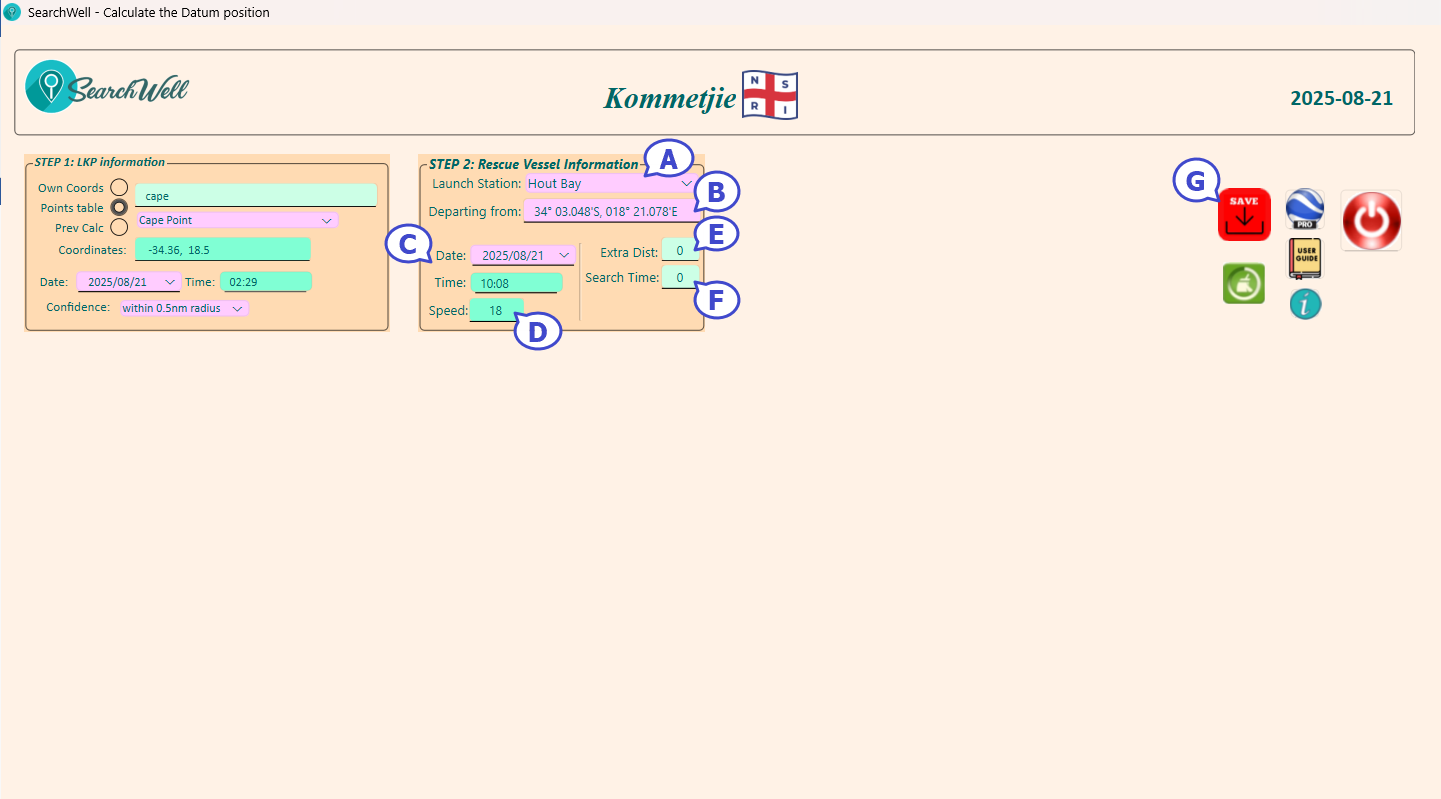
•A: The Launch Station defaults to the default station of the system, but it can be changed to any other station by clicking on the small downward arrow at the right side of the purple box and then selecting the required station. The "Departing from" coordinates are automatically updated to those of the selected station.
•B : The coordinates of where the rescue vessel will launch from. If the vessel is not launching from this point, eg it is already on the water, these coordinates can be changed
•C : The date and time the vessel will start the trip from the launch coordinates
•D : Average speed the vessel will be able to maintain on the trip to the search area (this is used to calculate the ETA at the search area)
•E : Extra distance - this is optional and is used if the distance from launch coordinates to the search area cannot be "as the crow flies" eg the rescue vessel has to go around a peninsula or an island. You will have to calculate the extra distance to round the obstacle - either in Google Earth Pro or similar application or an the chart. This distance is entered as nautical miles

•F : Search Time is also optional and is used when there is a limited search time (due to fuel or light). If you enter a number here, the drift time will include half of this search time - so the Datum position will be calculated on where the casualty will be halfway through the search time.
•G : Click on the Save button to continue
Created with the Personal Edition of HelpNDoc: Full-featured EPub generator